
Product Information
What is Flow-e?
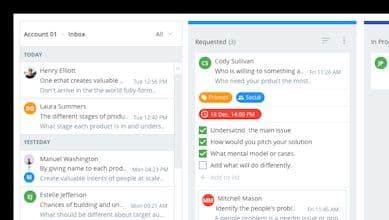
Turn your Gmail or Office 365 inbox into a visual task board with Flow-e. Delegate tasks, manage to-dos, schedule meetings, and set deadlines for your inbox.
How to use Flow-e?
Flow-e transforms your Gmail or Office 365 inbox into a visual task board, enabling you to delegate tasks, manage to-dos, schedule meetings, and set deadlines right within your inbox.
Core Functions of Flow-e
Transform inboxes into visual task boards
Delegate tasks
Manage to-do lists
Schedule Meetings
Set deadlines
Usage Scenarios of Flow-e
- Managers handling team task management
- Small business owners organizing workflows
- Manage tasks in Gmail inbox
- Manage tasks in Office 365 inbox
Common Questions about Flow-e
What does Flow-e do?
How do I use Flow-e?
What are the core features of Flow-e?
What are the use cases for Flow-e?