




Product Information
What is Deltatouch?
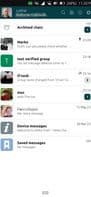
DeltaTouch is a community-created messenger based on deltachat-core. In other words, it's unofficial but compatible with the official Delta Chat client. It works with your existing email account while offering the look and feel of a messenger. For more information on email-supported messaging, visit https://delta.chat.
An incomplete list of current features:
**Account Setup**
- Log in with username/password
- Set up a second device via QR code
- Import backups
- Scan QR code invitations
**Multi-Account Support**
- Create and manage groups and verified groups
- Pin, archive, mute chats
- Search within chats
- Basic image viewer
- Basic audio/voice message player
- Record voice messages, preview before sending
- Export backups
- Most settings mirror the official client (e.g., display classic emails, auto-download size, etc.)
For system notifications, background suspension must be disabled, and the app must remain running in the background.
How to use Deltatouch?
DeltaTouch is an instant messaging app based on existing email accounts, combining the reliability of email with the convenience of chat tools, offering a traditional chat-like interface and functionality.
Core Functions of Deltatouch
Multi-account support, voice chat
Usage Scenarios of Deltatouch
- Communicate instantly via existing email accounts.
- Create and manage groups for team or community communication.
- Set up a second device or import backups via QR codes for easy multi-device use and data recovery.
- Send voice messages and preview them before sending.
- Manage chat records, such as pinning, archiving, muting, or searching.
Common Questions about Deltatouch
What does DeltaTouch do?
How do I use DeltaTouch?
What are the core features of DeltaTouch?
What are the application scenarios of DeltaTouch?



















