




Product Information
What is Retro aim server?
Retro Aim Server is an instant messaging server that revives the 2000s-era AOL Instant Messenger (and ICQ!) clients.
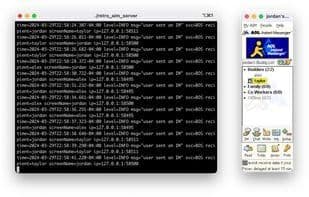
A screenshot of Retro Aim Server running alongside AIM
Supported features include:
**AIM**
- Windows AIM clients: v2.x, v3.x, v4.x, v5.x
- Away messages
- Buddy icons (v4.x, v5.x)
- Buddy lists
- Chat rooms
- Public and private chat exchanges
- Instant messaging
- User profiles
- Blocking (v3.5+)
- Visibility toggle/idle notifications
- Warnings
**ICQ**
- Windows ICQ clients: 2000b (more coming soon)
- Instant messaging
- Profiles
- User search
- Status
- Offline messaging
🏁 **How to Run**
Get Retro Aim Server up and running with one of these handy quick-start guides:
- Linux (x86_64)
- macOS (Intel and Apple Silicon)
- Windows 10/11 (x86_64)
Don’t have AIM installed yet? Check out the **AIM Client Setup Guide**.
...What about ICQ? See the **ICQ Client Setup Guide**.
🛠 **Development**
This project is actively developed. Contributions are welcome!
Follow this guide to learn how to compile and run Retro Aim Server.
🌍 **Community**
Join the **Retro Aim Server Discord** for help or to get involved.
📄 **License**
Retro Aim Server is licensed under the MIT License.
How to use Retro aim server?
Retro Aim Server revives classic 2000s AOL Instant Messenger (AIM) and ICQ clients, allowing users to self-host and relive nostalgic messaging experiences.
Core Functions of Retro aim server
Go Language
Usage Scenarios of Retro aim server
- Self-hosted instant messaging server compatible with classic AIM clients
- Self-hosted instant messaging server compatible with classic ICQ clients
- Run the server on Linux, macOS, or Windows 10/11 systems
- Relive the 2000s AOL Instant Messenger and ICQ communication experience
Common Questions about Retro aim server
What does Retro Aim Server do?
How do I use Retro Aim Server?
What are the core features of Retro Aim Server?
What are the use cases for Retro Aim Server?



















