




Product Information
What is Unigram?
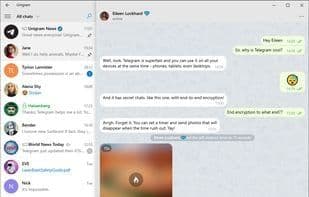
Unigram is a third-party Telegram client specifically designed for the Windows 10 platform.
In fact, thanks to the Universal Windows Platform, Unigram runs seamlessly on any Windows 10 device—PCs, smartphones, and Xbox One—delivering a high-performance and consistent user experience.
Moreover, this project is open-source, built by the community for the community, offering the highest level of transparency possible.
Since the beginning of this year, we've been working closely with the creators of TDLib to bring you the best Telegram experience on Windows 10. We're proud to announce that the wait is over—the app has been completely rewritten from the ground up to ensure the performance and stability you expect from Telegram. Some features from the old app may currently be unavailable, but don’t worry, we’re working to restore them as quickly as possible. If something important to you is missing, feel free to reach out! Your feedback is crucial in helping us prioritize our work.
Here’s what we’ve accomplished so far:
Every chat you open is now securely cached on your device, allowing you to browse them even without an internet connection.
Secret Chats are now fully supported: This enables you to communicate with friends using end-to-end encryption, even on your desktop.
My People integration: You can now pin contacts to your Windows taskbar and chat with them via Unigram without opening the full app.
Unigram – The universal version of Telegram.
Made by the community, for the community.
This is an unofficial client.
How to use Unigram?
Unigram is a third-party Telegram client for Windows 10 (PC, smartphones, Xbox One), designed for seamless, high-performance, and consistent user experience, built by the community.
Core Functions of Unigram
Support Telegram
Telegram
Cloud Sync
Channels
Dark Mode
Ad-Free
Usage Scenarios of Unigram
- Use Telegram on Windows 10 PC
- Use Telegram on Windows 10 smartphones
- Use Telegram on Xbox One
- Browse cached chat history without internet connection
- Secret chats with end-to-end encryption
- Pin contacts to Windows taskbar for quick chatting
Common Questions about Unigram
What does Unigram do?
How do I use Unigram?
What are the core features of Unigram?
What are the application scenarios of Unigram?



















