




Product Information
What is Awesome miner?
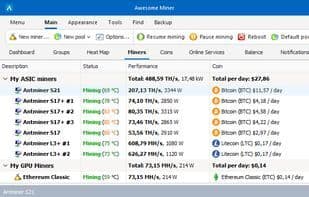
Awesome Miner is a Windows application for managing and monitoring various cryptocurrency mining processes, including Bitcoin, Litecoin, and Ethereum. Its next-gen profit-switching feature optimizes profitability by alternating between multiple pools, algorithms, and software. It also displays info, exchange rates, and profitability calculations for various coins.
The software includes notification and recovery features, sending alerts about mining issues via desktop notifications, email, SMS, or Telegram. It detects faulty devices, high temperatures, slow mining progress, and more, and can automatically restart problematic miners. Awesome Miner supports 11 mining engines like Cgminer, Bfgminer, and Sgminer, and 26 mining algorithms like SHA-256, Scrypt, and X11. Its pool management makes it easy to oversee pools and monitor each pool’s status.
It also tracks GPU, FPGA, and ASIC device status and temperature, providing system info. It supports large-scale GPU overclocking and configuration settings for remote systems.
Though a Windows app, Awesome Miner includes a web frontend accessible from any device, offering flexibility.
How to use Awesome miner?
Awesome Miner is a Windows application designed for managing and monitoring cryptocurrency mining operations. It aids users in maximizing mining profits and minimizing downtime by optimizing profitability, automating processes, and offering comprehensive monitoring features.
Core Functions of Awesome miner
Customizable, Script Support, Real-time Statistics, Export to CSV, CPU Monitoring, Multi-User Support
Usage Scenarios of Awesome miner
- Manage and monitor cryptocurrency mining processes like Bitcoin, Litecoin, and Ethereum.
- Automatically optimize mining profitability by switching between multiple pools, algorithms, and software.
- Receive alerts for mining equipment failures, overheating, etc., and automatically restart problematic miners.
- Monitor the operational status and temperature of GPU, FPGA, ASIC devices, and perform large-scale GPU overclocking.
- Automate mining operations, such as restarting, pausing, or changing pools based on triggers.
- Automatically control miner start/stop based on electricity prices or specific triggers for power cost reduction.
Common Questions about Awesome miner
What does Awesome Miner do?
How do I use Awesome Miner?
What are the core features of Awesome Miner?
What are the application scenarios of Awesome Miner?




















