




Product Information
What is Bitcoin tool?
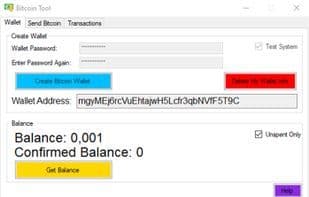
Bitcoin Tool allows you to create a Bitcoin wallet, send Bitcoin, and view all your transactions. Bitcoin Tool saves only one wallet address at a time and does not save the password for that wallet address. Please do not forget your password, as it cannot be recovered.
To create a wallet address, enter a password and select the test or main system in the "Wallet" section, then press "Create Bitcoin Wallet." A wallet address will be generated, which can be used even after closing the program until you delete the wallet information.
Other sections can only be used if you have a valid wallet address.
If you do not select the test system, transactions will be completed on Bitcoin's main system.
After entering the recipient's address, the amount to send, and the desired transaction fee, press the "Send" button to proceed with the transaction.
You can also view your transaction information at the bottom of the section.
View all transactions for the current wallet, including transaction IDs and amounts.
Negative values indicate that Bitcoin has been sent.
How to use Bitcoin tool?
Bitcoin Tool is desktop software designed to help users create Bitcoin wallets, send Bitcoin, and view all transaction records, offering convenient Bitcoin asset management.
Core Functions of Bitcoin tool
Blockchain
Usage Scenarios of Bitcoin tool
- Create new Bitcoin wallet addresses.
- Generate Bitcoin wallets on test or main systems.
- Send Bitcoin to specified recipient addresses.
- View all Bitcoin transaction details for the current wallet, including transaction IDs and amounts.
Common Questions about Bitcoin tool
What does Bitcoin Tool do?
How do I use Bitcoin Tool?
What are the core features of Bitcoin Tool?
What are the use cases for Bitcoin Tool?



















