




Product Information
What is Blocks edit?
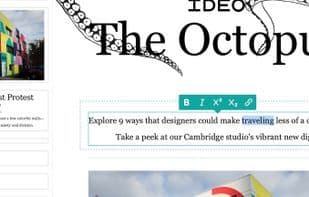
The simplest CMS setup, Blocks Edit, instantly transforms your HTML design into a point-and-click editable interface upon import. Visually configure editing options by clicking on content elements within the novel Blocks Edit theme editor. It's fully customizable around your design components. Use guardrails to maintain design and code integrity and consistency while editing content.
HTML-first CMS, no backend – Simply add classes and attributes to your HTML code for editable functionality
Design components – Leverage standard modular design practices that work with any HTML design
Efficiency meets quality – Build content rapidly while maintaining consistent quality levels
Modern CMS technology in a streamlined package
Drag-and-drop components, content as data, static output, and standard protocols.
Drag-and-drop boxes – Layout construction with point-and-click editing, no plugins required
Design system components – Standardized patterns for consistency, scalability, and collaboration
Content separate from design – Content updates as data while design code remains unchanged
Pure static site generation – No backend, no framework bloat, just your HTML and CSS
Standard web protocols – Works with any hosting and/or CDN service and data sources
Minimal setup requirements – Easy maintenance to avoid design and code debt over time
The most flexible CMS
Built around HTML patterns, adaptable to any form of design and functionality.
Manual sites – Set up a custom-designed website with less setup and maintenance
Landing pages – Skip complex website editors to streamline campaign creation
Email marketing – Enable your team to craft branded emails with full control over design and code
Digital forms – Configure any HTML form design for your team to review, edit, and build forms
Built for your entire organization
Point-and-click, drag-and-drop interface requires no formal training. Invite anyone to jump in, review, comment, and make necessary content changes.
Placeholder content – Demonstrate how content should be inserted to align with the design
Purposeful constraints – Set limits around content, such as text formatting, length, and image sizes
Fixed content for reuse – Store content in a library for your team to browse and reuse
Team comments – For editors building and editing content, or anyone reviewing via shared preview links
Revision history – Track who made updates, when, and view or revert to previous iterations
Custom workflows – Integrate with your tools, automate asset exports, and follow accessibility best practices
How to use Blocks edit?
Blocks Edit is a minimalist content management system that converts any HTML design into a visual editing interface, helping teams effortlessly create brand-compliant websites, marketing emails, and digital forms.
Core Functions of Blocks edit
Privacy-Focused, Lightweight, Email Template Editor, WYSIWYG HTML Editor, No Coding, Multi-Account Support
Privacy-Focused
Lightweight
Email Template Editor
WYSIWYG HTML Editor
No Coding Required
Multi-Account Support
Usage Scenarios of Blocks edit
- Brochure websites
- Landing Page
- Email marketing
- Digital forms
- Documents
Common Questions about Blocks edit
What does Blocks Edit do?
How do I use Blocks Edit?
What are the core functions of Blocks Edit?
What are the application scenarios of Blocks Edit?



















