




Product Information
What is Finance manager (pfa)?
A privacy-friendly finance manager helps you track income and expenses.
The app offers the following features:
**New Transaction**
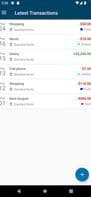
You can create a new expense by clicking the plus button in the bottom right corner of the main view. Here, you can enter the amount, title, date, and category. Additionally, you can specify whether the transaction is an expense or income.
**Transaction Overview**
In the main view, you can see the total balance of your transactions, along with a list of all the transactions you've entered. By long-pressing an entry, you can edit or delete the transaction.
**Categories**
Under the "Categories" menu item, you can view all the categories you've created and their total balances based on transactions tagged with each category. By clicking the plus button in the bottom right corner, you can create a new category. Long-pressing an entry allows you to edit or delete a category.
**Backup**
You can create a backup of the privacy-friendly finance manager database and restore it later using a privacy-friendly recovery method.
How to use Finance manager (pfa)?
Finance Manager (PFA) is a privacy-focused financial management tool designed to help users easily track and manage personal income and expenses.
Core Functions of Finance manager (pfa)
Privacy-focused, no tracking, no registration required
Privacy-focused, no tracking, no registration required
Usage Scenarios of Finance manager (pfa)
- Record new income and expense transactions, including amount, title, date, and category.
- View the total balance and detailed list of all entered transactions.
- Create, edit, and delete expense/income categories and view total balances by category.
- Create and restore backups of financial databases to protect data security.
Common Questions about Finance manager (pfa)
What does Finance Manager (PFA) do?
How do I use Finance Manager (PFA)?
What are the core features of Finance Manager (PFA)?
What are the use cases for Finance Manager (PFA)?



















