




Product Information
What is Iconjar?
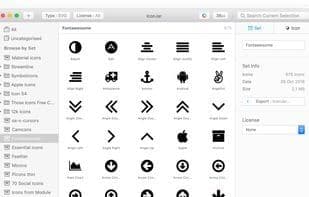
Organize, search, and use icons in a simple way. Iconjar enables you to store all your icons in one place, accessible with just a single click.
Boost Your Productivity
Time is money. It keeps your design assets folder neatly tucked away and grants you effortless access to icons.
Organize Your Design Assets
Iconjar is your personal organizer. Our tagging system makes it easy to find the perfect icon for your next design.
Effortlessly Search All Icons
Iconjar’s search is designed and developed with speed and efficiency in mind. It searches icons as you type—simple as that.
Drag and Drop Icons into Your Favorite Apps
Just drag any icon from Iconjar and drop it into the app you're working with. Figuratively speaking, it’s not rocket science.
Use with Your Favorite Apps
Adobe Photoshop
Sketch
Adobe Illustrator
How to use Iconjar?
Iconjar is a macOS icon management tool that helps users store, organize, and quickly search all their icons, improving design and development efficiency.
Core Functions of Iconjar
Image sharing
Asset Management
Usage Scenarios of Iconjar
- Drag and drop icons into design apps like Adobe Photoshop, Sketch, and Figma.
- Batch export icons for platforms like Android, iOS, and macOS.
- Optimize SVG icons to make them production-ready.
- Designers manage icon collections to ensure a smooth creative process.
- Engineers efficiently obtain and use icons during development.
- Marketers utilize icons to create stunning marketing content.
Common Questions about Iconjar
What does Iconjar do?
How do I use Iconjar?
What are the core features of Iconjar?
What are the use cases for Iconjar?



















