




Product Information
What is Quiver diagram editor?
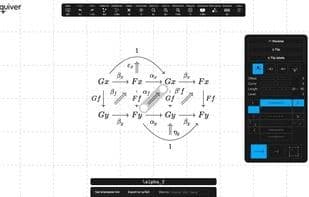
Quiver is a modern graphical editor designed for creating and manipulating commutative and pasting diagrams, capable of rendering high-quality diagrams for on-screen viewing and exporting them to LaTeX via Tikz-CD.
Creating and modifying diagrams with Quiver is orders of magnitude faster than manually writing equivalent LaTeX code, and it requires less experience to compete with pen-and-paper methods.
Quiver features an efficient, intuitive interface for crafting complex commutative and pasting diagrams. Drawing diagrams involving pullbacks and pushouts is effortless.
Quiver is designed to look great in screenshots and exports LaTeX that closely matches the original diagram.
Diagrams can be created and modified using either the mouse (click-and-drag) or the keyboard, with a comprehensive set of keyboard shortcuts available for any action.
When exporting a diagram to LaTeX, Quiver embeds a link to the diagram, allowing you to revisit it later for modifications or sharing with others.
Additional features include:
- Multi-selection for quick and easy batch adjustments.
- A history system supporting undo/redo operations.
- Support for custom macro definitions: simply paste a URL corresponding to a file containing \newcommand definitions.
- Exporting diagrams with embedded links to HTML.
- Pan and zoom functionality for large diagrams.
- Smart label alignment and edge offset adjustments.
How to use Quiver diagram editor?
Quiver is a modern graphical editor for creating and editing commutative diagrams and pasting diagrams, capable of quickly generating high-quality charts and exporting LaTeX code. It aims to improve diagram creation efficiency, much faster than writing LaTeX by hand.
Core Functions of Quiver diagram editor
Privacy-first
No Registration Required
Ad-Free
No tracking
Support LaTeX
Activity History
Privacy-Focused
Activity History
Usage Scenarios of Quiver diagram editor
- Create and edit commutative diagrams and paste diagrams
- Generate high-quality diagrams for screen display
- Export diagrams as LaTeX code (via tikz-cd)
- Draw complex mathematical diagrams involving pullbacks and pushouts
- Create beautiful diagram screenshots
- Share diagrams with others or export embeddable HTML diagrams
Common Questions about Quiver diagram editor
What does Quiver do?
How do I use Quiver?
What are the core features of Quiver?
What are the use cases for Quiver?



















