




Product Information
What is Screen-ruler?
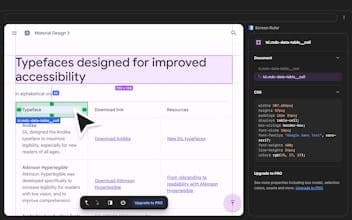
Screen Ruler is the perfect companion for web developers and designers. Measure the dimensions, distances, margins, and padding of any element on any webpage.
How to use Screen-ruler?
Screen Ruler is a Chrome extension designed for web developers and designers to measure dimensions, distances, margins, and padding of any element on a webpage, aiding in website implementation verification.
Core Functions of Screen-ruler
Measure pixel dimensions, margins, and padding of web elements
Measure pixel distance between any two elements
Display HTML tag names, class names, and IDs
Provide parent/child element selection shortcuts
View and copy computed CSS of elements
Responsive selection that adjusts with browser window size
Usage Scenarios of Screen-ruler
- Web developers and designers verifying website layout implementation.
- Quickly view the dimensions, margins, and padding of web elements.
- Precisely measure the distance between different elements on a web page.
- Inspect HTML structure information of elements (tags, classes, IDs).
- Analyze and copy CSS style properties of elements.
Common Questions about Screen-ruler
What does Screen Ruler do?
How do I use Screen Ruler?
What are the core features of Screen Ruler?
What are the application scenarios of Screen Ruler?



















