
Product Information
What is Base?
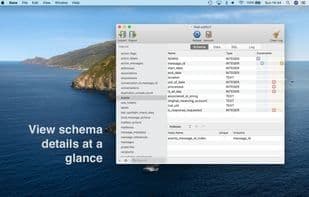
Base is an application for creating, designing, editing, and browsing SQLite 3 database files. It's a proper macOS app that launches quickly, gets you in, and retrieves the data you need. Base starts with all the basic features you need: • Schema viewing • Table content viewing/editing • Custom SQL queries • Command history Then it makes everything better: • Supports viewing and editing all column-level and table-level constraints, from simple defaults to complex foreign keys. • Advanced table design and changes. No need to manually enter CREATE TABLE statements—add, edit, and delete columns and constraints from a table while maintaining or moving its original data. • Quick data lookup and filtering. Build lengthy SELECT statements with a few clicks and preview results anytime. • Easy SQL editing with clear syntax highlighting and helpful SQL autocomplete. • Store frequently used SQL as snippets for easy reuse. • Easy import, full export. Import data from CSV or SQL files. Export to SQL, delimited text, XML, or Microsoft Excel-compatible formats.
How to use Base?
Base is a SQLite database editor specifically designed for macOS, offering the functionality to create, design, edit, and browse SQLite 3 database files, aimed at making database operations more convenient and efficient.
Core Functions of Base
SQLite
Usage Scenarios of Base
- Create, design, and edit SQLite 3 database files
- Browse and manage database structures, such as viewing table schemas, column types, and constraints
- View, edit, and filter table contents
- Write and execute SQL queries with intelligent autocomplete and syntax highlighting
- Import data from CSV or SQL files and export to SQL, text, JSON, or Excel formats
- Store commonly used SQL query snippets for reuse
Common Questions about Base
What does Base do?
How do I use Base?
What are the core features of Base?
What are the use cases for Base?