




Product Information
What is Batch files?
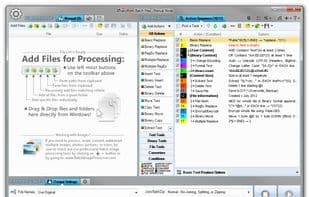
Replace, insert, delete, copy, move, format, extract, convert, encode, and encrypt text and bytes across multiple files. Process 1000 files using multiple CPU cores in manual, automatic/continuous, triggered/scheduled, or console modes, or directly from the Windows Explorer right-click menu. Save files to an output directory specified by absolute or relative paths, using either the original names or new names defined by masks. Utilize advanced file search with support for regular expressions and advanced wildcards to select files for processing based on their names, dates, sizes, and contents. Optionally merge files together, split all files, or compress processed files. Perform different actions on different files through conditional processing and workflow branching. The entire program fully supports regular expressions (RegEx) and Unicode. Detailed processing logs are available in both the user interface and log files. Run multiple program instances simultaneously.
How to use Batch files?
Batch Files is a powerful file processing tool capable of performing operations such as replacing, inserting, deleting, copying, moving, formatting, extracting, converting, encoding, and encrypting text and bytes across multiple files, with support for efficient batch processing.
Core Functions of Batch files
Portable
Bulk Editing
Batch rename files
Support for Regular Expressions
Hex editor
Code search
Usage Scenarios of Batch files
- Batch replace specific text or bytes in multiple files.
- Use regular expressions for advanced file searches and processing based on filename, date, size, and content.
- Merge, split, or compress processed files.
- Perform format conversion, encoding, or encryption on large numbers of files.
- Execute different operations on different files through conditional processing and flow branching.
- Perform file operations directly from the Windows Explorer right-click menu.
Common Questions about Batch files
What do Batch Files do?
How do I use Batch Files?
What are the core features of Batch Files?
What are the use cases for Batch Files?



















