




Product Information
What is Browsers?
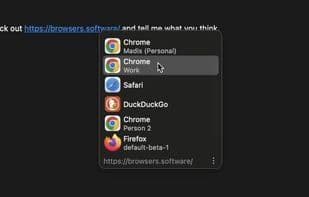
A small browser selection dialog pops up when opening links from apps (other than browsers). Supports profiles for most browsers and Firefox containers.
How to use Browsers?
Browsers is an open-source, cross-platform tool that pops up a browser selection dialog when links are opened from non-browser apps, helping users open links in the right browser at the right time, with support for browser profiles and Firefox containers.
Core Functions of Browsers
Lightweight, Easy to Use
Usage Scenarios of Browsers
- Choose the appropriate browser when opening links from non-browser apps like chat tools or email clients.
- Open links in specific browser profiles based on work or personal needs.
- Open links in Firefox containers to isolate different online identities or sessions.
- Open relevant links directly in desktop applications like Figma, Notion, Slack, etc.
- Open links in incognito/private mode.
Common Questions about Browsers
What does Browsers do?
How do I use Browsers?
What are the core features of Browsers?
What are the use cases for Browsers?


















