




Product Information
What is Calctape?
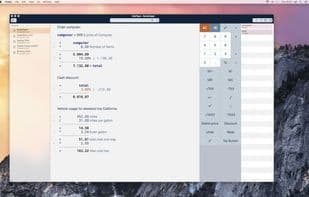
CalcTape is a revolutionary new pocket calculator. With CalcTape, even large calculations remain clearly structured. CalcTape makes arithmetic processes visible—you can generate intermediate results and then correct or change all numbers and operations. CalcTape for Windows—Details: Enter many calculation terms at once and still maintain an overview—just like on an adding machine. Change any term afterward, and CalcTape will automatically refresh the entire calculation. Use intermediate results to check and build your calculations. Comment on your calculation terms to give them meaning and context. Save your calculations to files. Open the file later, and you can change the calculation. CalcTape will automatically refresh the entire calculation again and again. Use existing CalcTape files as templates. Perform similar calculations and play with different scenarios. Use programmable buttons, e.g., for quick tax calculations. CalcTape handles the four basic arithmetic operations, exponents, and percentage calculations. CalcTape for Windows requires Windows XP, Windows Vista (x86 and x64), or Windows 7 (x86 and x64). Extended features in the Pro and Enterprise versions: A scratchpad for daily calculations that saves automatically. Compare calculations side by side. Use variables and generate 'talking' calculations. Define as many programmable keys as you need. Use parentheses and trigonometric functions when defining variables. And much more...
How to use Calctape?
CalcTape is an innovative calculator that keeps complex calculations clearly structured and visualizes arithmetic processes, allowing users to generate intermediate results and modify numbers and operations at any time.
Core Functions of Calctape
Directory
Usage Scenarios of Calctape
- Input numerous calculation items and maintain an overview, just like using an adding machine.
- Modify any calculation item at any time, and CalcTape will automatically refresh the entire calculation.
- Use intermediate results to check and organize calculations.
- Add comments to calculation items to give them meaning and context.
- Use existing CalcTape files as templates for similar calculations or to simulate different scenarios.
- Copy and paste rows of numbers for summarization, such as comparing with database values.
Common Questions about Calctape
What does CalcTape do?
How do I use CalcTape?
What are the core features of CalcTape?
What are the use cases for CalcTape?



















