




Product Information
What is Caploader?
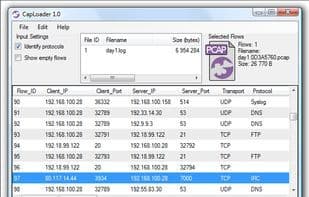
CapLoader indexes PCAP/PcapNG files and visualizes their content as lists of TCP and UDP streams. Users can select streams of interest and quickly filter out those packets from the loaded PCAP file. Selected streams/packets can be sent to packet analyzer tools like Wireshark or NetworkMiner with a single click. CapLoader is ideal for handling large PCAP files up to several gigabytes (GB) in size. Exporting the contents of individual streams to tools like Wireshark and NetworkMiner takes just seconds.
How to use Caploader?
CapLoader is a Windows tool for indexing and visualizing PCAP/PcapNG network traffic capture files, helping users quickly filter and export TCP and UDP streams of interest from large datasets.
Core Functions of Caploader
Logging
Network Scanner
Network Tools
Usage Scenarios of Caploader
- Process large PCAP files of several gigabytes in size.
- Filter out TCP and UDP streams of interest from PCAP files.
- Send selected traffic/packets to packet analysis tools like Wireshark.
- Export the content of individual streams to tools like NetworkMiner for further analysis.
Common Questions about Caploader
What does CapLoader do?
How do I use CapLoader?
What are the core features of CapLoader?
What are the use cases for CapLoader?




















