




Product Information
What is Cell signal monitor?
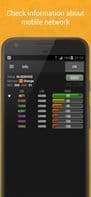
The first tab contains the following information:
• Connection status (In Service/Emergency Only/Out of Service/Radio Off)
• Operator name along with its MCC and MNC
• Network technology (GPRS/EDGE/UMTS/LTE)
• Current Cell Identity (CID)
• Current Area Identity (LAC/RNC/TAC)
• Signal strength (RSSI and RSRP for LTE networks)
A graph displays the variation in mobile connection strength and speed, aiding in monitoring signal level (RSSI) and the actual data volume in the channel. The log and statistics show information about the Base Transceiver Stations (BTS) recently used by the smartphone. This can be displayed after importing a CLF file containing cell location data.
How to use Cell signal monitor?
Cell Signal Monitor is an application designed specifically for Android devices to check the operational status of GSM, UMTS, and LTE cellular networks, providing detailed monitoring and analysis of network parameters.
Core Functions of Cell signal monitor
Real-time monitoring
Usage Scenarios of Cell signal monitor
- Check signal strength of nearby base stations and analyze dynamic changes.
- Measure incoming and outgoing connection speeds.
- Create cell ID logs.
- Display base station locations (after importing special CLF files).
- Generate cell usage statistics.
Common Questions about Cell signal monitor
What does Cell Signal Monitor do?
How do I use Cell Signal Monitor?
What are the core features of Cell Signal Monitor?
What are the use cases for Cell Signal Monitor?



















