




Product Information
What is Checkip.sh?
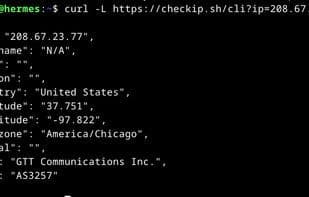
A lightweight, privacy-respecting service that instantly displays your public IP address and network metadata from a browser or command line. Designed for speed and simplicity, it returns clean JSON or readable HTML pages—no ads, trackers, or bloat. You can also look up any IP address.
Whether you're a developer, sysadmin, or just curious about your internet status, checkIP.sh makes it easy to:
- View your public IP address
- Look up ASN, ISP, geolocation, and reverse DNS
- Access it from any terminal using `curl` or `wget`
- Share a quick IP snapshot in human-readable format
Unlike bloated alternatives, checkIP.sh is open, minimal, and fast—typically returning full results in under 0.5 seconds.
How to use Checkip.sh?
Checkip.sh is a lightweight, privacy-focused service for instantly checking public IP addresses and network metadata, offering quick, ad-free JSON or HTML outputs with no trackers.
Core Functions of Checkip.sh
Lightweight, ad-free, command-line interface, no registration, web tools
Usage Scenarios of Checkip.sh
- Developers check their public IP address and network metadata.
- System administrators query ASN, ISP, geolocation, and reverse DNS information.
- Access IP information from any terminal via command-line tools like curl or wget.
- Quickly share readable IP snapshots.
- Regular users learn about their internet presence information.
Common Questions about Checkip.sh
What does Checkip.sh do?
How do I use Checkip.sh?
What are the core features of Checkip.sh?
What are the use cases for Checkip.sh?



















