




Product Information
What is Codemenu?
Super-powered snippet manager.
Manage your snippets
CodeMenu offers all the features you'd expect from a snippet manager, such as tags, groups, and sorting by language.
**Groups**
Snippets in groups only appear in the group's dedicated view, allowing you to separate unrelated snippets.
**Tags**
Tagged snippets are displayed alongside others, but you can access them via the tag view.
**Languages**
In the sidebar, you’ll find a list of languages used in your snippets, making it easier to access snippets in a specific language.
**Edit Snippets**
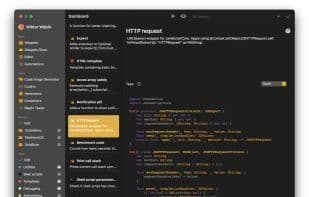
The CodeMenu snippet editor comes packed with features, from basics like syntax highlighting to advanced capabilities such as previewing HTML and Markdown, running snippets directly, and generating libraries.
**Preview**
View Markdown formatting right in the editor. Click the eye icon in the toolbar to open a split window displaying the rendered HTML.
**Run Snippets**
Click the arrow icon to execute a snippet’s code directly from CodeMenu, simplifying snippet testing.
**Library Generation**
This feature lets you quickly create files that can be shared and auto-updated across multiple or single snippets, enhancing accessibility.
**Access Snippets**
CodeMenu aims to streamline snippet management, offering new ways to access snippets directly from your code editor. Whether you're a touch typist who wants instant suggestion pop-ups or prefer an organized window, the choice is yours.
**Side Panel**
The side panel appears on one edge of your screen and can be accessed via gestures or keyboard shortcuts. It provides a faster way to reach your snippets and the Snippet Store. Simply drag a snippet from the panel into your editor.
**Suggestions**
With suggestions, you can quickly search snippets from within the editor. Just type §§ to bring up a window. Continue typing to search, then use the ? and V key bindings to select a snippet, which will appear at your cursor. This feature requires the additional helper app—CodeMenu Suggestions.
**Snippet Store**
The Snippet Store is an online database filled with snippets shared by others, including you. You can also add them to your library. With the Snippet Store, there’s no need to scour search engines for common snippets—just use the convenient side panel or dashboard to find what you need.
**Useful Tools in One Place**
Beyond snippet management, CodeMenu includes handy tools like a RegEx tester, converters (binary, hex, octal), generators (e.g., UUID), and encoders (hashing with SHA256 and MD5, Base64, and URL encoding/decoding).
How to use Codemenu?
CodeMenu is a powerful code snippet manager designed to help creators capture, organize, and reuse various digital assets like code, prompts, images, and notes, thereby enhancing productivity and achieving 'enhanced memory.'
Core Functions of Codemenu
Code Snippet Manager
Usage Scenarios of Codemenu
- Efficiently manage code, prompts, images, notes, etc.
- Access, edit, preview, and run snippets directly in editors.
- Built-in tools for regex testing, base conversion, UUID generation, encoding/decoding.
- Search, share, and get shared snippets via Snippets Store.
- Capture color palettes, screenshots, research notes with contextual grouping/tagging.
- Quick recall/reuse via semantic search, suggestions, abbreviations.
Common Questions about Codemenu
What does CodeMenu do?
How do I use CodeMenu?
What are the core features of CodeMenu?
What are the use cases for CodeMenu?



















