
Product Information
What is Codeviz?
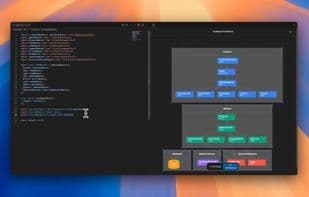
CodeViz builds a visual map of your codebase for quicker understanding and navigation. Engineers spend only a fraction of their time actually writing code—we're tackling that issue.
Features
Control Flow: Create mappings of calls between classes, functions, interfaces, and more.
Architecture Diagram: Generate high-level system architecture diagrams linked to individual files.
Usage
Open your project in VS Code
Click the CodeViz icon in the sidebar
Choose "Control Flow" or "Architecture" view—the Control Flow view updates with cursor position
Click on graph nodes to jump to relevant sections of the code
If the Control Flow view isn't appearing, ensure you have the relevant VS Code extension for your programming language installed.
How to use Codeviz?
CodeViz accelerates feature development and improves code comprehension efficiency by building a visual map of the codebase, helping engineers understand and navigate code faster.
Core Functions of Codeviz
Ad-Free
VS Code
Architecture visualization
Usage Scenarios of Codeviz
- Quickly understand and navigate code repositories.
- Accelerate feature development and delivery.
- Explore code repositories at multiple levels, from system architecture to specific function calls.
- Explore key code by asking natural language questions and clicking to navigate.
- Quickly jump to relevant parts of the code by clicking on graph nodes.
Common Questions about Codeviz
What does CodeViz do?
How do I use CodeViz?
What are the core features of CodeViz?
What are the use cases for CodeViz?