




Product Information
What is Commands manager?
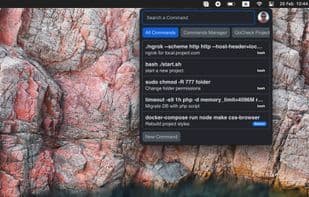
Commands Manager is a powerful and intuitive tray utility designed to streamline your workflow by providing instant access to the most frequently used terminal commands. It allows you to effortlessly store, search, and copy commands using keyboard shortcuts, enhancing development efficiency.
The app runs in the system tray, ensuring quick access whenever needed. It supports macOS, Windows, and Linux, seamlessly integrating into any development environment. Commands can be organized into folders, color-coded, and easily shared with teammates. Cloud sync keeps your commands and settings up to date across multiple devices.
Whether working in the terminal or an IDE, Commands Manager simplifies command management, saving you time and effort.
How to use Commands manager?
Commands Manager is a tray utility tool designed to streamline workflows by providing instant access to frequently used terminal commands. It allows users to store, search, and copy commands easily via keyboard shortcuts, enhancing development efficiency.
Core Functions of Commands manager
Team collaboration
Code Snippet Manager
Code snippets
Usage Scenarios of Commands manager
- Quickly manage and use common commands while working in a terminal or IDE.
- Share command sets for specific projects with team members to ensure collaborative consistency.
- Quickly search, copy, and execute commands with keyboard shortcuts to boost productivity.
- Organize numerous commands into different folders for easy categorization, searching, and management.
Common Questions about Commands manager
What does Commands Manager do?
How do I use Commands Manager?
What are the core features of Commands Manager?
What are the use cases for Commands Manager?



















