




Product Information
What is Commit?
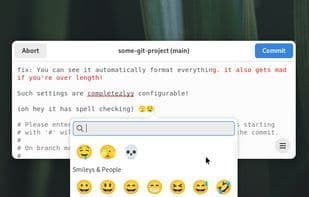
Commit is an editor designed to help you craft better Git and Mercurial commit messages.
Features:
• Highlights overflow in commit titles
• Smart line wrapping
• Inserts a blank line between the title and body
• Spell checking
• Comments are read-only and excluded from "Select All"
• Displays project folder and branch in the window title
• Dark mode support
• Keyboard navigation and shortcuts
• Undo/Redo functionality
• Emoji picker
• Supports git commit, merge, tag --annotate, add --patch, rebase --interactive
• Supports Mercurial commit
• Automatically capitalizes commit titles
• Includes a welcome window with settings and instructions
• Syntax highlighting for Git, Mercurial, and diff
How to use Commit?
Commit is an editor designed to help developers write better Git and Mercurial commit messages by offering various assistive features to improve the quality and standardization of commit messages.
Core Functions of Commit
Privacy-Focused, No Tracking, No Coding Required, Built-in Viewer, No Registration, Works Offline
Usage Scenarios of Commit
- Write Git commit messages.
- Write Mercurial commit messages.
- Handle commit messages for Git merge operations.
- Add notes to Git tags.
- Edit commit messages during Git interactive rebase.
- Edit commit messages during Git staged changes.
Common Questions about Commit
What does Commit do?
How do I use Commit?
What are the core features of Commit?
What are the use cases for Commit?



















