




Product Information
What is Connectmenow?
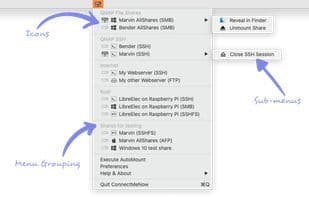
Quickly connect to network shares on macOS with ConnectMeNow—a small, free dropdown for the Mac menu bar, supporting SMB, AFP, NFS, FTP (read-only), WebDAV, SSHFS (via OSXFUSE), and SSH.
SSH and SSHFS work with auto-filled passwords or SSL/SSH keys. Tools for generating and installing these keys are included.
The app is 64-bit, signed, and notarized.
Updated to version 4 in December 2022 with a native Apple Silicon version.
How to use Connectmenow?
ConnectMeNow is a free macOS menu bar app that simplifies mounting network volumes and accessing SSH connections quickly and easily on Macs.
Core Functions of Connectmenow
Mount Drive
Mount FTP Drive
Network Tools
Mount Local Drive
SSH
SSL Client Certificate
Usage Scenarios of Connectmenow
- Quickly connect to network shares on Mac OS X
- Access corporate network shares
- Connect to dedicated file servers or NAS for information storage or backups
- Make SSH connections more convenient
- Keep network shares mounted on Mac
Common Questions about Connectmenow
What does ConnectMeNow do?
How do I use ConnectMeNow?
What are the core features of ConnectMeNow?
What are the application scenarios of ConnectMeNow?




















