




Product Information
What is Emmet re:view?
Emmet Re:view displays your responsive web pages side by side in multiple views, allowing you to quickly test how they appear across different resolutions and devices. All views are fully synchronized: scroll, fill out form fields, click, hover, and drag elements in one view, and get instant feedback in all others.
Features
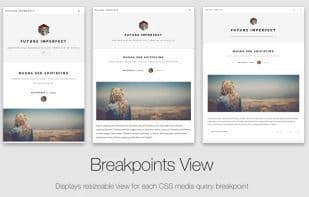
Breakpoint Views
Show resizable views for each CSS media query breakpoint of your page. Content from large viewports is scaled down to fit your screen size.
Device Wall
A bird's-eye view of device-sized viewports. Each view is scaled according to the page’s `<meta name="viewport">` tag and overrides the User-Agent with real device values.
Easy to Use
In Google Chrome, navigate to a webpage with a responsive layout.
Click the browser icon to enable Re:view.
Toggle between display modes, select any existing device or preset, or even create your own!
How to use Emmet re:view?
Emmet Re:view is a browser extension designed to display responsive web pages side by side, enabling quick testing of how pages appear across different resolutions and devices. It offers instant feedback through synchronized views, streamlining the responsive design testing process.
Core Functions of Emmet re:view
Cross-browser testing
Usage Scenarios of Emmet re:view
- Quickly testing webpage display at different resolutions.
- Quickly testing webpage display on different devices.
- Synchronizing scrolling, form filling, clicking, hovering, and dragging elements across multiple views.
- Viewing resizable layouts for each CSS media query breakpoint.
- Getting a bird's-eye view of device-sized viewports.
Common Questions about Emmet re:view
What does Emmet Re:view do?
How do I use Emmet Re:view?
What are the core features of Emmet Re:view?
What are the use cases for Emmet Re:view?




















