




Product Information
What is Htmlpad?
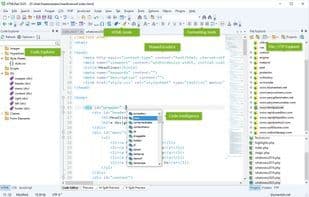
HTMLPad is an HTML, CSS, JavaScript, and XHTML editor featuring FTP connectivity, an HTML validator, and spell-checking capabilities. Designed to enhance productivity and accelerate the coding process with an integrated AI assistant, this lightweight editor supports multiple languages, offers intelligent code completion, navigation, and suggestions, and includes a built-in library of code snippets and templates.
The AI assistant can generate and optimize code, while HTMLPad allows for direct editing on your web server or publishing updates with a single click. It comes with built-in multi-browser preview, split-screen mode, screen size testing, developer tools, and advanced search-and-replace functionality. Compatible with HTML5 and CSS3, HTMLPad provides tools like tag matching, HTML Tidy, HTML/CSS inspectors, and CSS compatibility monitoring. It also includes a JavaScript editor with autocomplete and language tools, along with validation features such as a spell checker and CSS validator.
How to use Htmlpad?
HTMLPad is a lightweight editor for HTML, CSS, JavaScript, and XHTML, featuring integrated FTP connectivity, code validation, and spell-checking capabilities. It's designed to boost productivity and accelerate the coding process with its built-in AI assistant.
Core Functions of Htmlpad
Support Themes, Work Offline, Syntax Highlighting, FTP Support, SFTP Support
Usage Scenarios of Htmlpad
- Edit HTML, CSS, JavaScript, and XHTML code.
- Modify and publish code updates directly on the web server.
- Use AI assistants to generate and optimize code.
- Perform search and replace operations across multiple files.
- Preview HTML code changes instantly.
Common Questions about Htmlpad
What does HTMLPad do?
How do I use HTMLPad?
What are the core features of HTMLPad?
What are the application scenarios of HTMLPad?




















