




Product Information
What is Hurl - choose a browser?
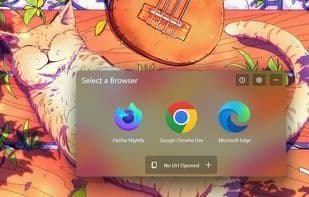
Sometimes you might want to open links in your browser of choice, not the default one. Hurl is designed to let you select a browser every time you click a link (outside of browsers). Naturally, it acts as the default browser to do this. Hurl can be launched via browser extensions, allowing you to open browser tabs in another browser.
Fast startup and lightweight
Supports adding your own browsers with launch parameters
Web extension for opening browser tabs within Hurl
How to use Hurl - choose a browser?
Hurl is a Windows tool that lets users choose which browser to open links with instead of the default browser. It acts as the default browser and can be used with browser extensions to open current tabs in another browser.
Core Functions of Hurl - choose a browser
Lightweight
Customizable
Configurable
Selector
Browser integration
Quick reference lookup
Usage Scenarios of Hurl - choose a browser
- Choose a non-default browser to open links when clicked.
- Open links outside the browser, such as those in PDF files.
- Open the current browser tab in another browser.
- Choose a browser when clicking links in email clients (e.g., Thunderbird).
- Switch tabs to a different Chrome user profile.
Common Questions about Hurl - choose a browser
What does Hurl do?
How do I use Hurl?
What are the core features of Hurl?
What are the use cases for Hurl?



















