




Product Information
What is Hype?
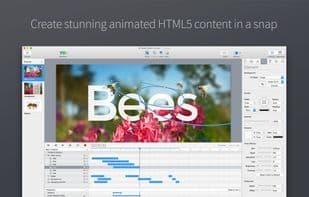
Create stunning animations and interactive web content with Hype. Hype's HTML5 output works across all modern browsers and mobile devices like iPhones and iPads—no coding required.
Top designers use Hype to bring "wow" to web pages, infographics, presentations, digital magazines, ads, iBooks, educational content, app prototypes, portfolios, animated GIFs, videos, entire websites, and more. Hype won the Macworld Editor’s Choice Award in 2011.
From prototyping to production, anyone can create rich interactive media with Hype.
**Animate in a Flash:**
• Easy-to-use keyframe-based animation system
• Record mode tracks your movements, auto-creating keyframes as needed
• Use Bézier paths for natural motion curves
• Organize with scenes for better workflow
• Run animations with multiple simultaneous timelines
**Add Interactivity:**
• Action handlers trigger and control timelines, scene transitions, or custom JavaScript
• Visually build action handlers for taps, clicks, and animation events
**Create Stunning Content:**
• WebKit-based WYSIWYG scene editing
• Smart guides, alignment, and adjustment tools
• Seamless video and audio integration for multimedia brilliance
• Cutting-edge effects: blur, hue shift, brightness, saturation, shadows, reflections, and 3D transforms
• Add Google Fonts or use custom CSS web fonts
• Flexible layout system adapts content to any screen
• Retina image support
**Mobile-Friendly:**
• Hype’s HTML5 output shines on mobile
• Easily add swipes and touch gestures
• Bind drag events to timeline positions for rich interactivity
• Preview projects on iPhones and iPads with the free Hype Reflect iOS companion app
• Mirror mode in Hype Reflect shows edits in real time
...and much more. (We ran out of space!)
How to use Hype?
Hype is an HTML5 content creation tool for macOS that lets users create stunning animations and interactive web content without coding. It helps produce rich interactive media for all modern browsers and mobile devices.
Core Functions of Hype
Export as MP4
Multiple timelines
Usage Scenarios of Hype
- Create web animations and interactive content
- Design infographics and presentations
- Produce digital magazines and advertisements
- Develop application prototypes and portfolios
- Create animated GIFs and videos
- For educational content and iBooks
Common Questions about Hype
What does Hype do?
How do I use Hype?
What are the core features of Hype?
What are the use cases for Hype?



















