




Product Information
What is Kommit git client?
KDE's Git GUI Client.
Features
Show overlay icons on files in the Dolphin file manager
Browse files or commits in another branch and view file contents
Auto-completion when writing commit messages
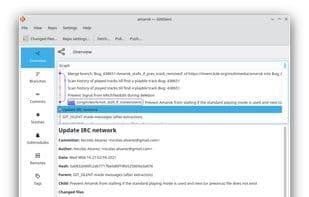
Graphical view of commits and merges
Visual representation of changes
View differences and conflicts with visual tools and resolve them
How to use Kommit git client?
Kommit Git Client is a Git graphical user interface client designed for the KDE desktop environment, aiming to simplify Git version control operations through visual tools, helping users manage code repositories, view changes, and resolve conflicts.
Core Functions of Kommit git client
Auto-Completion
Git support
Usage Scenarios of Kommit git client
- View Git status icons on files in Dolphin file manager
- Browse file contents across different branches or commits
- Get autocomplete suggestions when writing commit messages
- View commit and merge history through graphical visualization
- Visually examine differences and conflicts for resolution
Common Questions about Kommit git client
What does Kommit Git Client do?
How do I use Kommit Git Client?
What are the core features of Kommit Git Client?
What are the use cases for Kommit Git Client?















