




Product Information
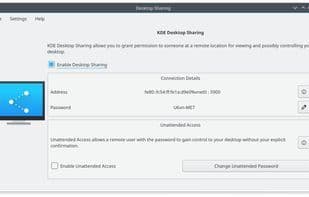
What is Krfb?
Krfb (server) is one of a pair of KDE programs - Krdc (client) being the other - that enables you to share your desktop with another user over the local network (making it remotely visible), perhaps to someone like the tech support downstairs whom you seek help from for an issue you're encountering. You can call the technician and converse with her as she assists you. If you choose to allow it, the technician can even "drive" your computer.
How to use Krfb?
Krfb is a KDE program that enables users to share their desktop over a local network, allowing others to remotely view their computer. It is primarily used for providing remote technical assistance and even permits remote users to control your computer.
Core Functions of Krfb
Ad-free, unattended access, screen sharing, real-time collaboration, desktop sharing, no registration required
Usage Scenarios of Krfb
- Technicians remotely assist users with computer issues
- During phone calls, technicians remotely view desktops and provide guidance
- Allow technicians to remotely control computers for operations
Common Questions about Krfb
What does Krfb do?
How do I use Krfb?
What are the core features of Krfb?
What are the application scenarios of Krfb?



















