




Product Information
What is Losslesscut?
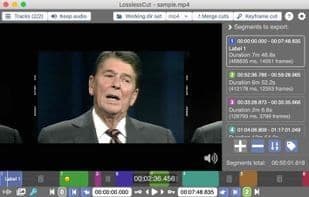
A simple cross-platform video editor for lossless trimming/cutting of videos. Perfect for rough editing of large video files captured from cameras, GoPros, drones, and more. It lets you quickly extract the good parts from videos and discard gigabytes of data without any loss in quality. Since it doesn't perform any decoding/encoding, it operates incredibly fast. Additionally, it allows taking JPEG snapshots of the video at selected times. This app utilizes the powerful ffmpeg to handle the heavy lifting. It also supports lossless cutting of the most common audio formats.
How to use Losslesscut?
LosslessCut is a simple, cross-platform video editor designed for lossless trimming and cutting of video and audio files. It processes large files quickly by avoiding re-encoding, helping users extract highlights from videos without quality loss and save storage space.
Core Functions of Losslesscut
Lightweight
Privacy focused
Lossless Cropping
No re-encoding
Cut video
Split Video
Usage Scenarios of Losslesscut
- Quickly process large video files from cameras, GoPros, drones, etc.
- Extract highlights from videos and discard large amounts of data without quality loss.
- Cut ads from recorded TV shows.
- Remove audio or video tracks from files.
- Add music to videos (or replace existing tracks).
- Fix incorrect video rotation or convert formats for different playback devices.
Common Questions about Losslesscut
What does LosslessCut do?
How do I use LosslessCut?
What are the core features of LosslessCut?
What are the use cases for LosslessCut?



















