




Product Information
What is Mitec hexedit?
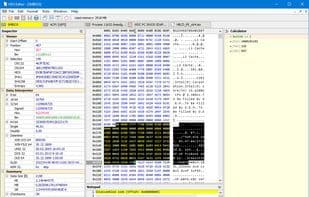
HexEdit is a powerful hexadecimal editor capable of examining files, drives, and memory.
For instance, by selecting the "File" menu, you can choose to view a file, storage device, or a block of RAM. Its flexibility exceeds expectations for such a compact, portable utility. For example, if you opt to inspect RAM, you can access the BIOS, System Management BIOS, Video BIOS, or a custom RAM range with just a single click.
Once your target is open, you can navigate its contents, utilize search or search-and-replace tools, or manually edit the data. If you need to open additional items, go ahead—HexEdit adds a new tab for each project you launch. There are also unconventional operation options, such as inserting one file into another, appending files, or converting files based on various encodings (ANSI, OEM Code Page 850, ASCII 7-bit, MAC, EBCDIC Code Page 038).
If that’s not enough, you also gain access to robust extras, including a disassembler and a scientific calculator—quite impressive for a portable tool that’s only a 1MB download.
How to use Mitec hexedit?
MiTeC HexEdit is a powerful hexadecimal editor capable of inspecting and editing files, drives, and memory, offering flexible RAM viewing options along with various file operations and auxiliary tools.
Core Functions of Mitec hexedit
Portable
Hex editor
File comparison
Usage Scenarios of Mitec hexedit
- Inspect the contents of files, storage devices, or memory blocks.
- Access and view BIOS, system management BIOS, video BIOS, or custom RAM ranges.
- Browse content, using search or search-and-replace tools.
- Manually edit file or memory contents.
- Insert one file into another or append files.
- Convert files according to different encodings (e.g., ANSI, OEM Codepage 850).
Common Questions about Mitec hexedit
What does MiTeC HexEdit do?
How do I use MiTeC HexEdit?
What are the core features of MiTeC HexEdit?
What are the use cases for MiTeC HexEdit?




















