




Product Information
What is Mobaxterm?
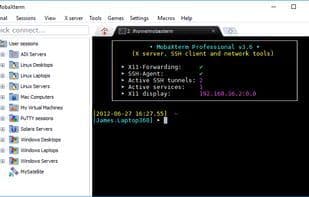
MobaXterm is an enhanced terminal application that brings the advanced functionalities of Unix-like command lines to Windows. It harnesses the power of Cygwin and packages it within a sleek, visual interface that's incredibly user-friendly, lightweight, and portable. MobaXterm bundles an X11 server, SSH client, and other essential network tools like FTP, VNC, RDP, telnet, and rlogin into a single executable file.
Key Features:
- Fully configured X server based on Xorg.
- Tabbed terminal with anti-aliased fonts and macro support.
- Easy display export from any remote host.
- X11 forwarding capability from OpenSSH.
- Unix/Linux commands based on Cygwin, such as rsync, wget, sed, awk, grep, cd, ls, cat, and cp.
- Session manager with multiple network clients: RDP, VNC, SSH, telnet, rsh, FTP, SFTP, and XDMCP.
- No installation required; runs directly from a USB stick.
- Lightweight and portable, packaged as a single executable.
How to use Mobaxterm?
MobaXterm is an enhanced terminal application for Windows users, offering powerful Unix-like command-line functionality, integrated X11 server, SSH client, and various network tools to simplify remote computing tasks.
Core Functions of Mobaxterm
Customizable
X server
Support SFTP
SSH
Tabbed interface
Embedded X server
Usage Scenarios of Mobaxterm
- Programmers performing remote computations
- Website administrators managing remote servers
- IT administrators handling remote tasks
- Manage numerous Linux/Unix servers
- Connect to remote servers
- Seamlessly display remote applications on Windows desktops
Common Questions about Mobaxterm
What does Mobaxterm do?
How do I use Mobaxterm?
What are the core features of Mobaxterm?
What are the application scenarios for Mobaxterm?




















