
Product Information
What is Multiglancer?
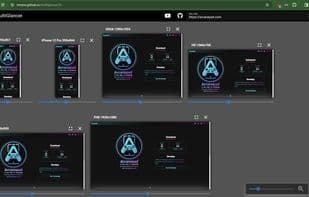
MultiGlancer is a minimalist, open-source tool I developed to streamline the web development process. It enables developers to view a website across multiple screen sizes simultaneously on a single display. Born out of necessity while refining the landing page for ArcanePad.com, MultiGlancer significantly enhanced my workflow, and I believe it can do the same for yours. What sets MultiGlancer apart is its simplicity and ease of use. Adjusting and testing responsiveness can often be a click-heavy and time-consuming task. MultiGlancer eliminates the repetitive work of resizing browser windows or clicking through device options in developer tools.
With fewer than 100 lines of custom code, MultiGlancer epitomizes simplicity, yet it’s built on the robust Quasar.js template, leveraging Vue and Vite to deliver a seamless, fast experience. Self-hostable and user-friendly, MultiGlancer is a boon for developers without secondary monitors. You can effortlessly serve it on your local LAN and transform your tablet into a versatile auxiliary screen, displaying multiple views at once. This feature revolutionized my own setup, allowing real-time observation across various screen resolutions—all without the need for an extra monitor, making it a space-saving and cost-effective solution.
How to use Multiglancer?
MultiGlancer is an open-source tool that simplifies web development by allowing developers to view a website's display across multiple screen sizes on a single screen, eliminating repetitive window adjustments and improving responsive testing efficiency.
Core Functions of Multiglancer
Web debugging
Usage Scenarios of Multiglancer
- View Website Display Effects on Multiple Screen Sizes Simultaneously on a Single Screen
- Simplify Responsive Adjustments and Testing During Web Development
- Developers Using Tablets as Multi-View Displays Without Additional Monitors
- Observe Website Performance in Real-Time Across Different Screen Resolutions
Common Questions about Multiglancer
What does MultiGlancer do?
How do I use MultiGlancer?
What are the core features of MultiGlancer?
What are the use cases for MultiGlancer?