




Product Information
What is Netsetman?
Are you tired of changing network configurations on your laptop every day? The same routine over and over? At home: switch settings... at the office: switch settings...
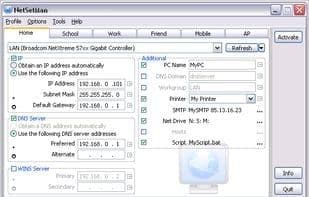
Then NetSetMan is your solution in 21 languages. It does the job for you. NetSetMan is a network settings manager that allows easy switching between 6 different, visually structured profiles, including:
IP address, subnet mask, default gateway, DNS server, WINS server, computer name, workgroup, DNS domain, default printer, network drives, NIC status, SMTP server, host file entries, scripts (BAT, VS, JS...).
How to use Netsetman?
NetSetMan is a network settings manager designed to help users easily switch between different network configurations, saving time and effort by eliminating frequent manual changes.
Core Functions of Netsetman
Portable Web Tools
Usage Scenarios of Netsetman
- Quickly Switch Network Configurations at Different Locations Like Home or Office
- Automatically Change Network Parameters Like IP Address, Subnet Mask, and DNS Server
- Set Default Printers Based on Different Scenarios
- Map or Disconnect Network Drives
- Dynamically Change SMTP Servers for Email Clients
- Set Different Computer Names for Different Locations
Common Questions about Netsetman
What does NetSetMan do?
How do I use NetSetMan?
What are the core features of NetSetMan?
What are the application scenarios of NetSetMan?



















