




Product Information
What is Network scanner (lizardsystems)?
Network Scanner is an IP scanner designed for scanning large enterprise networks with hundreds of thousands of computers as well as small home networks with multiple computers. The program can scan lists of IP addresses or computers, along with ranges of IP addresses. There are no limits on the number of computers or subnets.
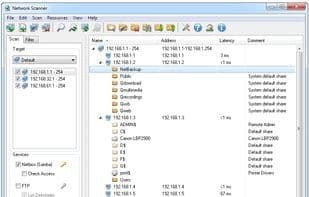
The Network Scanner will display all resources for you, including both system and hidden NetBIOS resources, as well as FTP and web resources. Not only can network administrators use Network Scanner to audit networked computers, but regular users can also utilize it to search for available network resources.
Network Scanner not only locates network computers and resources but also checks their access permissions (read/write). You can mount the found resources as network drives or open them in Explorer or a browser.
You can export the network scan results to XML, HTML, or text files, or store them within the program.
How to use Network scanner (lizardsystems)?
Network Scanner is an IP scanning tool for networks of various sizes, quickly discovering computers, shared resources, and checking access permissions to help users audit network resources and improve management efficiency.
Core Functions of Network scanner (lizardsystems)
Network Scanner
Usage Scenarios of Network scanner (lizardsystems)
- Scan hundreds of thousands of computers in large enterprise networks.
- Scan a few computers in small home networks.
- Network administrators auditing network computers and resources.
- Regular users finding available network resources.
- Check read/write access permissions for shared network resources.
- Export scan results to XML, HTML, or text files for analysis.
Common Questions about Network scanner (lizardsystems)
What does Network Scanner do?
How do I use Network Scanner?
What are the core features of Network Scanner?
What are the use cases for Network Scanner?




















