




Product Information
What is Networkmanager by borntoberoot?
NETworkManager is a powerful tool for managing networks and troubleshooting network issues! It includes various tools such as an IP scanner, port scanner, ping monitor, WiFi analyzer, PuTTY/RemoteDesktop with tabs, or LLDP/CDP capture (and more) in a unified user interface.
Features
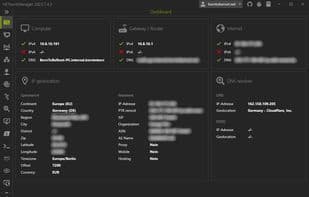
Dashboard
Network Interface - Information, Bandwidth, Configuration
WiFi - Networks, Channels
IP Scanner
Port Scanner
Ping Monitor
Traceroute
DNS Lookup
Remote Desktop
PowerShell
PuTTY (requires PuTTY)
AWS Session Manager (requires AWS CLI and AWS Session Manager plugin)
TigerVNC (requires TigerVNC)
Web Console (requires Microsoft Edge - WebView2 Runtime)
SNMP - Get, Walk, Set
SNTP Lookup
Discovery Protocol - LLDP, CDP
Wake on LAN
Whois Lookup
Subnet Calculator - Calculator, Subnetting, Supernetting
Bit Calculator
Lookup - OUI, Port
Connections
Listeners
ARP Table
How to use Networkmanager by borntoberoot?
NETworkManager is a powerful network management and troubleshooting tool integrating multiple network tools in a unified interface, helping users analyze networks, manage remote systems, and resolve issues effectively.
Core Functions of Networkmanager by borntoberoot
No Registration Required
No Installation Required
Ad-Free
Wake-on-LAN
Dark Mode
Available Offline
Usage Scenarios of Networkmanager by borntoberoot
- Analyze networks and gather details using WiFi analyzers, IP scanners, and port scanners.
- Connect to remote systems to manage network and server infrastructure, e.g., via Remote Desktop, PuTTY, or PowerShell.
- Diagnose and resolve network issues.
- Save hosts and networks with custom configurations, organized by client or environment.
Common Questions about Networkmanager by borntoberoot
What does NETworkManager do?
How do I use NETworkManager?
What are the core features of NETworkManager?
What are the use cases for NETworkManager?



















