




Product Information
What is Office search?
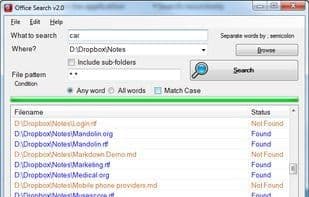
Search within Microsoft Office (Word, Excel, PowerPoint, Visio), LibreOffice, Rich Text Format, and text/ASCII files (TXT/CSV/MD/source code, etc.).
You can add your own text file types to search.
Search using "any" or "all" conditions.
Real-time search without indexing.
For all other files, it uses fuzzy logic to check whether the file is text or binary. If it's text, it searches the file content for matches.
Compatible with Windows 7 or later. Requires .NET Framework 4.7 or higher.
Open-source software developed with VB.NET 2019.
How to use Office search?
Office Search is a desktop full-text search tool for quickly finding content in Microsoft Office, LibreOffice, and various text/ASCII files, providing efficient local file content retrieval.
Core Functions of Office search
Full-Text Search
Usage Scenarios of Office search
- Find specific information in Microsoft Office documents like Word, Excel, and PowerPoint.
- Search content in LibreOffice Writer, Calc, and Impress documents.
- Retrieve data from text/ASCII files like TXT, CSV, MD, and HTML.
- Extend search scope by adding custom file types.
- Perform precise searches based on 'any' or 'all' conditions.
- Open searched files directly from the Office Search application.
Common Questions about Office search
What does Office Search do?
How do I use Office Search?
What are the core features of Office Search?
What are the use cases for Office Search?



















