




Product Information
What is Openfreebuds?
This application allows you to control HUAWEI FreeBuds earphone settings from your PC. Check accurate battery levels, toggle noise cancellation, manage the built-in equalizer, change gestures, and access all other in-device settings and features—now available without the official mobile app.
Features:
- Dynamic system tray icon showing current active noise cancellation mode and battery level;
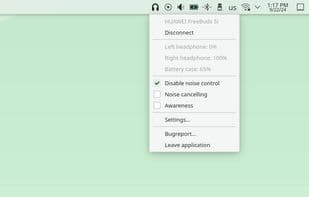
- Tray menu with battery status and active noise cancellation settings;
- Ability to change voice language (not supported on all devices);
- Device settings dialog for adjusting equalizer presets, gesture controls, and more;
- Built-in HTTP server for remote control and scripting;
- Built-in global hotkey support (XOrg only; for Wayland, see FAQ).
Tested with: HUAWEI FreeBuds 4i / 5i / Pro / Pro 2 / Pro 3 / SE, HUAWEI FreeLace Pro / Pro 2.
Also compatible with newer/older devices in the same series.
How to use Openfreebuds?
OpenFreebuds is a free, open-source app that allows users to control various settings of Huawei FreeBuds headphones via their computers without needing the official mobile app.
Core Functions of Openfreebuds
Privacy-Focused
Dark Mode
Work Offline
Ad-Free
No Tracking
No Registration Required
Usage Scenarios of Openfreebuds
- View the exact battery level of Huawei FreeBuds headphones on your computer.
- Switch the noise-canceling mode of the headphones.
- Adjust the built-in equalizer settings.
- Modify the custom gesture controls of the headphones.
- Remote control and scripting via the built-in HTTP server.
- Use global hotkeys to quickly operate headphone functions.
Common Questions about Openfreebuds
What does OpenFreebuds do?
How do I use OpenFreebuds?
What are the core features of OpenFreebuds?
What are the use cases for OpenFreebuds?



















