




Product Information
What is Parallels desktop?
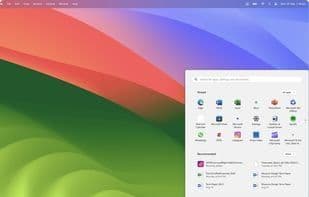
Parallels Desktop is a virtualization program that allows Windows and Windows-based applications to run on Mac systems. It enables running macOS, Windows, and Linux simultaneously on a single device. As the first Microsoft-approved solution to run Windows on Apple silicon Macs, Parallels Desktop supports Windows 11 on Apple silicon Mac systems.
Key features include playing popular Windows games, running Windows 11 on Arm Pro and Enterprise via Apple Silicon on Mac, accessing Windows apps like Microsoft Office 365, Excel, and PowerPoint. It supports both Intel and ARM-based Macs and is compatible with the latest macOS and Windows versions. Users can adjust resources allocated to virtual machines (VMs), such as CPU, GPU, and RAM, for better performance. Parallels Desktop offers various viewing options, including making Windows invisible while using its apps or setting Windows to full-screen. It facilitates file and image transfers between Windows and Mac apps, allowing users to directly access and open files stored on Mac within the Windows environment. It also supports playing classic Windows-exclusive games on Mac.
How to use Parallels desktop?
Parallels Desktop is a virtualization program allowing users to seamlessly run Windows and Linux OS and applications on macOS, enabling simultaneous use of macOS, Windows, and Linux on the same device.
Core Functions of Parallels desktop
Run Windows software
Virtualization
Support Apple M1
Compatibility layer
Available Offline
Ad-Free
Usage Scenarios of Parallels desktop
- Run Windows and Linux operating systems on Mac
- Play popular Windows games on Mac
- Use Windows apps like Microsoft Office 365, Excel, PowerPoint on Mac
- Transfer files and images between Mac and Windows apps
- Set up Windows or Linux virtual machines on Mac
- Run Windows apps in 'Coherence' mode on Mac
Common Questions about Parallels desktop
What does Parallels Desktop do?
How do I use Parallels Desktop?
What are the core features of Parallels Desktop?
What are the use cases for Parallels Desktop?




















