




Product Information
What is Ping tracer?
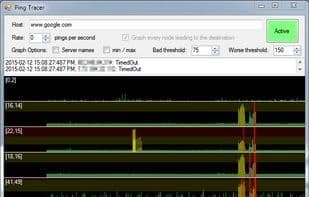
This program helps visually identify the source of connection issues. Latency over time is displayed on a graph, with each instance of packet loss marked in red.
A common use for this tool is monitoring your connection to a multiplayer game server, so you know who to blame when experiencing lag. For example, if you encounter severe lag and notice that every node beyond your router shows high latency or packet loss, the issue lies on your side. Typically, a poorly performing node affects your connection to every subsequent node.
I originally built this program for personal use and decided to share it as open-source for free. As a result, it has fewer features and polish.
One thing to note is that when you attempt to "graph every node along the path to a destination," a traceroute operation is performed to discover the hosts that will be monitored.
The traceroute operation is not optimized for speed and often takes several seconds to complete.
It only attempts to contact each host (or network node) once. Any host that fails to respond during the traceroute will not be monitored.
If three consecutive hosts fail to respond, the traceroute ends. This usually indicates that the target host has been passed and is not responding to trace pings.
Some hosts respond to traceroute but not to direct pings. Technically, these hosts could still be monitored by repeating parts of the traceroute, but I believe doing so would go against the host owner's intentions.
I've allowed you to increase the ping rate up to 10 pings per second (per host!), which can add up to dozens or even hundreds of pings per second. That's a bit—maybe even a little—excessive. I don't recommend actually running it that high. In fact, 1 ping per second is likely sufficient.
How to use Ping tracer?
Ping Tracer is a graphical ping and traceroute application that continuously pings each network node between your computer and a target host, displaying latency and packet loss in charts to help users visually identify connection issues.
Core Functions of Ping tracer
Lightweight
Ping graph
Route Tracking
Network Tools
No Registration Required
Ad-Free
Usage Scenarios of Ping tracer
- Monitor connections to multiplayer game servers to identify the source of latency.
- Visually determine the root cause of network connection issues.
- Analyze whether network latency or packet loss occurs on the user side or further network nodes.
- View performance changes of each network node through a graphical interface.
Common Questions about Ping tracer
What does Ping Tracer do?
How do I use Ping Tracer?
What are the core features of Ping Tracer?
What are the application scenarios for Ping Tracer?



















