




Product Information
What is Pingpong status pages?
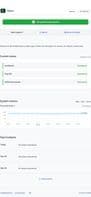
PingPong Status Pages: A free, all-in-one status communication tool. Companies rely on the PingPong status page platform to inform users about system outages and scheduled maintenance, while also displaying historical system monitoring.
With integrations across more than 10 platforms including Intercom, Slack, Microsoft Teams, WhatsApp, and Telegram, respond to incidents in Slack faster and reach all users when issues arise...
Monitor your own systems from 10 global locations and showcase uptime. Keep an eye on external third-party services your systems depend on, and get notified when they experience downtime or maintenance.
Bring transparency to your users with a beautifully designed, fully customizable status page. Available in 17 languages.
How to use Pingpong status pages?
PingPong is a free all-in-one status communication tool designed to help companies communicate during system outages and planned maintenance, displaying historical system monitoring data to build customer trust and reduce support tickets.
Core Functions of Pingpong status pages
Incident Management
Uptime Monitoring
Status Page
Notifications
Usage Scenarios of Pingpong status pages
- Communicate with users during system outages and planned maintenance.
- Monitor proprietary systems and display uptime.
- Monitor third-party services and receive notifications when they fail.
- Incident response teams quickly address issues and reach all users.
- Support teams reduce repetitive tickets or cumbersome email lists.
- Sales and marketing teams showcase product reliability to potential clients.
Common Questions about Pingpong status pages
What does PingPong do?
How do I use PingPong?
What are the core features of PingPong?
What are the application scenarios of PingPong?



















