




Product Information
What is Powertoys - color picker?
📣 This application is part of the Microsoft PowerToys bundle and cannot be downloaded separately.
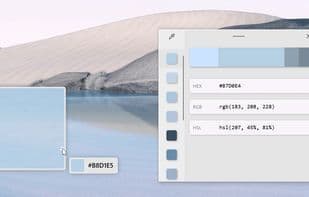
ColorPicker is a system-wide color selection utility activated by Win+Shift+C. It allows you to pick colors from anywhere on your screen, automatically copying the selected color to the clipboard in your chosen format. The ColorPicker includes an editor that displays a history of previously selected colors, enabling you to fine-tune your selection and copy different string representations.
### Enabling ColorPicker
To start using ColorPicker, enable it in the PowerToys settings (under the ColorPicker tab).
### Activating ColorPicker
Once enabled, you can choose one of three behaviors when activating the tool with the shortcut (default: Win+Shift+C):
- **Open Editor**: Directly opens the editor window, where you can select colors from history, fine-tune selections, or capture new colors by opening the picker.
- **Pick Color and Open Editor**: Opens the color picker. After selecting a color, the editor opens, and the color is copied to the clipboard (in the default format—configurable in settings).
- **Pick Color Only**: Only opens the color picker, copying the selected color to the clipboard.
### Selecting a Color
When the ColorPicker is activated, hover your cursor over the desired color and left-click to select it. To inspect the area under the cursor in more detail, scroll up to zoom in. The copied color is stored in the clipboard in the configured format (default: HEX).
### Settings
ColorPicker offers the following settings:
- **Activation Shortcut**
- **Activation Behavior**
- **Default Color Format** (e.g., HEX, RGB, etc.)
- **Show Color Name**: Displays an advanced representation of the color (e.g., Light Green, Green, Dark Green).
- **Order and Presence of Color Formats in the Editor**
How to use Powertoys - color picker?
PowerToys - Color Picker is a system-wide color picker that lets users select colors from anywhere on the screen, copy them to the clipboard, and provides an editor for fine-tuning and managing color history.
Core Functions of Powertoys - color picker
Ad-Free, Portable, Built-in Color Picker, Hex Editor, Color Picker, Extract Color Palettes from Images
Usage Scenarios of Powertoys - color picker
- Pick Colors from Anywhere on the Screen
- Automatically Copy Picked Colors to Clipboard in Multiple Formats (e.g., HEX, RGB)
- Fine-Tune Selected Colors in the Color Editor
- View and Manage Previously Picked Color History
- Display Advanced Color Descriptions, Such as 'Light Green'
Common Questions about Powertoys - color picker
What does PowerToys - Color Picker do?
How do I use PowerToys - Color Picker?
What are the core features of PowerToys - Color Picker?
What are the use cases for PowerToys - Color Picker?



















