




Product Information
What is Protonup-qt?
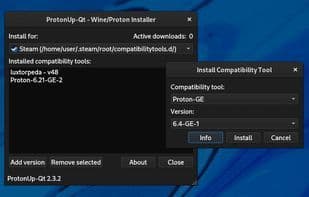
Use this graphical user interface to install and manage Wine and Proton-based compatibility tools for Steam and Lutris.
Supported launchers:
Steam
Lutris
Heroic Games Launcher
Bottles
Supports regular, Snap, and Flatpak installations
Supported compatibility tools:
GE-Proton
SteamTinkerLaunch
Proton-Tkg
Luxtorpeda
Boxtron
Roberta
Polaris Proton
Scrumplex’s Steam-Play-None
Wine-GE
Lutris-Wine
Kron4ek’s Vanilla Wine
DXVK and DXVK Async
D8VK
VKD3D
Double-click a compatibility tool to view more information and games using that tool.
Advanced settings and color themes can be managed in the "About" dialog.
How to use Protonup-qt?
ProtonUp-Qt is a graphical user interface tool for installing and managing Wine and Proton-based compatibility tools, supporting game launchers like Steam, Lutris, Heroic Games Launcher, and Bottles. It simplifies the installation and management of these compatibility tools.
Core Functions of Protonup-qt
Ad-free, no registration required, compatible layer
Usage Scenarios of Protonup-qt
- Install and manage compatibility tools like GE-Proton for the Steam gaming platform.
- Install and manage compatibility tools like Wine-GE for the Lutris game manager.
- Manage compatibility tools for platforms like Heroic Games Launcher and Bottles.
- Double-click a compatibility tool to view more information and games using it.
- Manage advanced settings and color themes in the About dialog.
Common Questions about Protonup-qt
What does ProtonUp-Qt do?
How do I use ProtonUp-Qt?
What are the core features of ProtonUp-Qt?
What are the use cases for ProtonUp-Qt?



















