




Product Information
What is Public dns server tool?
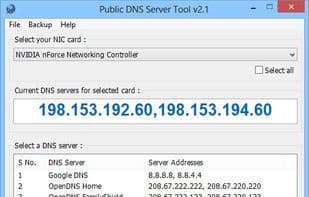
Public DNS Server Tool is a small utility designed to dynamically change DNS servers in Windows XP, Vista, 7, and 8. Over the past few years, numerous public DNS servers have become available for everyone to use. Some of these include OpenDNS, Google, Norton, Comodo Secure, and others. Besides being extremely fast, these DNS servers offer multiple layers of security and protection. Although these public DNS servers are accessible to all, configuring DNS settings in Windows isn't always straightforward. That's why I created this handy little tool—the Public DNS Server Tool—to make setting up DNS servers in Windows a breeze.
It has been tested and works on Windows XP Professional SP3 (32-bit), Windows Vista SP2 (32-bit), Windows 7 (32-bit), and Windows 8 (64-bit).
With the Public DNS Server Tool, you can quickly switch to preset pairs of public DNS servers. Currently, it includes eight preset DNS server pairs:
- Google Public DNS
- OpenDNS
- OpenDNS FamilyShield (blocks non-family-friendly websites)
- Norton ConnectSafe A (blocks malicious sites)
- Norton ConnectSafe B (blocks malicious sites + pornography)
- Norton ConnectSafe C (blocks malicious sites + pornography + non-family-friendly sites)
- Comodo Secure DNS (blocks malicious sites)
- DNS Advantage
How to use Public dns server tool?
This is a small tool for quickly switching DNS servers in Windows OS, simplifying the complex process of setting up public DNS servers, allowing users to easily leverage the speed and security benefits of public DNS.
Core Functions of Public dns server tool
Portable
DNS Server
Usage Scenarios of Public dns server tool
- Quickly switch to preset public DNS servers in Windows
- Use OpenDNS FamilyShield to block family-inappropriate websites
- Block malicious or pornographic content via Norton ConnectSafe DNS servers
- Backup and restore current DNS server settings
- Improve internet speed with Cloudflare DNS or Google Public DNS
Common Questions about Public dns server tool
What does the Public DNS Server Tool do?
How do I use the Public DNS Server Tool?
What are the core features of the Public DNS Server Tool?
What are the use cases for the Public DNS Server Tool?



















