




Product Information
What is Putty tray?
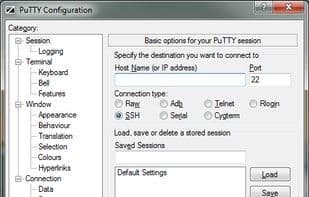
PuTTY Tray is an enhanced version of PuTTY. It features several visual modifications and numerous plugins, making it more useful and enjoyable to use.
Originally compiled by Barry Haanstra, it is now maintained by Chris West (Faux).
Features:
- Minimize to system tray (via CTRL + minimize, always, or directly at startup)
- Customizable (tray) icons
- Flashing tray icon upon receiving a bell signal
- Configurable window transparency
- URL hyperlinks
- Portability: Option to store session configurations in files (e.g., on a USB drive), similar to portaPuTTY
- Easy access to the "Always on Top" setting (in the system menu)
- Reconnect when your computer wakes from standby
- Attempt to reconnect upon connection failure
- Android adb support
How to use Putty tray?
PuTTY Tray enhances PuTTY with added features and UI improvements for a better experience.
Core Functions of Putty tray
Portable
SSH
Transparency
Usage Scenarios of Putty tray
- Minimize PuTTY sessions to the system tray for easy management of multiple connections.
- Customize tray icons and window transparency for a personalized interface.
- Quickly access links in sessions via URL hyperlink functionality.
- Store configurations on USB drives for portable use.
- Automatically attempt to reconnect after the computer wakes from standby or a connection is interrupted.
- Perform related operations using its Android adb support feature.
Common Questions about Putty tray
What does PuTTY Tray do?
How do I use PuTTY Tray?
What are the core features of PuTTY Tray?
What are the use cases for PuTTY Tray?



















