




Product Information
What is Remote diagnostics tool?
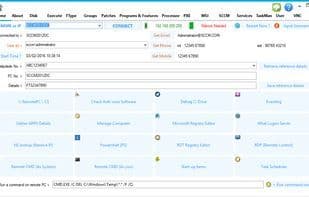
RDT (Remote Diagnostics Tool for Windows Administrators)
RDT includes the following features:
Last boot time
List users/logged-in users
Login server test
IP address lookup
File associations
Screen capture
Export to CSV functionality
Remote defragmentation of C drive
Remote encrypted command prompt
Remote software installation and removal!
Remote SCCM client tools
Remote SCCM history list
Remote SCCM advertisement list (user)
Remote SCCM advertisement list (machine)
Remote SCCM rerun advertisements
Remote APPV 4.x support
Remote APPV 5.x support
Remote Windows update reports
Remote drive information
Remote antivirus check
Remote security groups
Remote BIOS report
Remote video card report
Remote network card report
Remote registry editor
Remote programs and features report
Remote PowerShell session
Remote service control
Remote startup items viewer
Remote quick processor usage report
Remote detailed processor report
Remote user settings report
Remote encrypted VNC viewer
How to use Remote diagnostics tool?
Remote Diagnostics Tool (RDT) is a desktop management tool for IT professionals and Windows administrators, designed to help them remotely diagnose and support computers in enterprise networks.
Core Functions of Remote diagnostics tool
Portable
Usage Scenarios of Remote diagnostics tool
- IT professionals providing remote support for computers in corporate networks.
- Windows administrators remotely installing or uninstalling software.
- Remotely diagnose computer boot times, logged-in users, and IP addresses.
- Remotely view and manage Windows update reports, drive information, and security groups.
- Remotely execute encrypted commands, capture screens, or edit the registry.
- Remotely monitor processor usage and view hardware reports.
Common Questions about Remote diagnostics tool
What does Remote Diagnostics Tool do?
How do I use Remote Diagnostics Tool?
What are the core features of Remote Diagnostics Tool?
What are the application scenarios for Remote Diagnostics Tool?




















