




Product Information
What is Riff?
Riff - A Difference Filter Highlighting Which Parts of a Line Have Changed
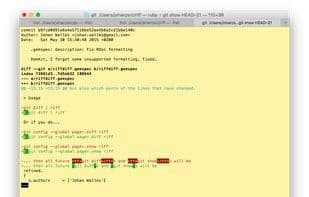
Riff is a wrapper for diff that not only highlights which lines have changed but also which parts of the lines have been altered.
### Usage
Pipe git diff into Riff:
```
git diff | riff
```
Or, if you prefer...
```
git config --global pager.diff riff
git config --global pager.show riff
```
...then all future `git diff` and `git show` commands will be enhanced with Riff.
For installation instructions, visit the website:
[https://github.com/walles/Riff#installation](https://github.com/walles/Riff#installation)
How to use Riff?
Riff is a diff filter that not only shows which lines have changed but also highlights the specific parts within those lines, providing clearer code difference visualization.
Core Functions of Riff
Git support
Command Line Interface
File comparison
Folder Comparison
Rust
Usage Scenarios of Riff
- View diffs directly via the pipe command `git diff | riff`.
- Configure Git pager to automatically optimize `git diff` output with Riff.
- Configure Git pager to automatically optimize `git show` output with Riff.
Common Questions about Riff
What does Riff do?
How do I use Riff?
What are the core features of Riff?
What are the application scenarios for Riff?



















