



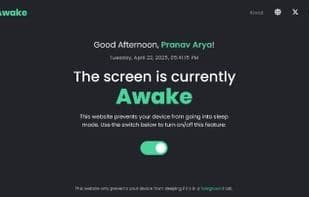

Product Information
What is Stay awake?
Ever stopped for a coffee? Or a chat, only to return to a locked screen with your Teams/Slack status showing "away"? Annoying, right? Constantly tweaking system sleep settings is a pain.
That’s why I built Stay Awake! It’s a super simple web app with one main goal:
👉 Keep your computer awake temporarily without changing any system settings.
How? Just keep the Stay Awake browser tab open and active in the foreground. The app uses your browser’s built-in features (Screen Wake Lock API or fallback) to signal to your OS that you’re "still active," preventing sleep/lock mode.
It’s perfect for:
• Grabbing a quick coffee without logging back in.
• Keeping your status "online" in messaging apps during short breaks.
• Avoiding the hassle of diving into system power settings for temporary needs.
As a bonus, while the tab is active, you also get some handy widgets:
• Clock? & battery 🔋 status
• Quick to-do list?
• Pomodoro timer 🍅 for focused work during breaks!
It saves your widget preferences locally and works as an installable PWA.
Important: This magic only works when the Stay Awake tab is the active, foreground window in your browser. If you switch tabs or apps, your normal screen sleep settings take over.
How to use Stay awake?
Stay Awake is a simple web app that helps users temporarily keep their computers awake without changing system settings, preventing screen locks or messaging apps from displaying 'away' status.
Core Functions of Stay awake
Progressive Web Apps
Web-based
Usage Scenarios of Stay awake
- Prevent computer lockouts requiring re-login during short breaks like coffee runs.
- Maintain online status on communication apps (e.g., Teams/Slack) during short breaks.
- Avoid frequent adjustments to system power settings for temporary needs.
- Use built-in Pomodoro timers for focused work.
- View clock and battery status.
Common Questions about Stay awake
What does Stay Awake do?
How do I use Stay Awake?
What are the core features of Stay Awake?
What are the application scenarios of Stay Awake?




















