




Product Information
What is Stylem?
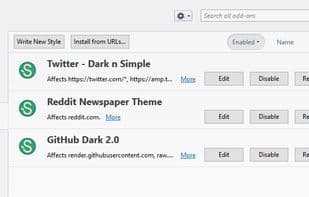
Do you want to change the appearance of a website or adjust a part of your browser? Use Stylem (a user style manager for Pale Moon, Basilisk, and other XUL-based applications) to style them! Stylem is forked from the latest fully open-source version of Stylish for Firefox (2.0.7) and allows you to create custom CSS files for any element of any website or any part of the browser. If you prefer using pre-made user styles, you can find many on userstyles.org and install them by clicking the "Install Style" button on each listing. These will then appear in your Add-ons Manager (about:addons) and even receive automatic updates if available.
If you come across any other CSS files you'd like to install from elsewhere, you can also add them via the Add-ons Manager by pasting the CSS file's URL into the "Install from URL" button or by pasting the CSS itself into a new style. However, unlike styles installed from userstyles.org, these will not receive any updates.
Stylem functions largely the same as Stylish, so you can refer to the help pages on userstyles.org for FAQs and general information. Internally, though, some things have changed—for example, extensions designed for Stylish may not work with Stylem and may need adjustments if necessary.
If you're a former Stylish user, make sure to disable or remove Stylish before using Stylem, as the two are incompatible due to their deep integration with the Add-ons Manager, which can cause issues. Any styles saved in Stylish will be transferred, as both Stylish and Stylem use the same storage format. However, Stylish's own settings will not carry over, as Stylem uses its own settings (found in about:config under the extension .Stylem .*).
How to use Stylem?
Stylem is a user style manager that allows users to change the appearance of any website or browser interface by creating custom CSS files, enabling personalized customization.
Core Functions of Stylem
Legacy Firefox add-on
Blue Moon Extension
Legacy Firefox add-on
Pale Moon Extension
Usage Scenarios of Stylem
- Change the display style of specific websites.
- Adjust a part of the browser interface.
- Create custom CSS for specific elements of a website.
- Install pre-made user styles from userstyles.org.
- Install CSS files from other sources.
Common Questions about Stylem
What does Stylem do?
How do I use Stylem?
What are the core features of Stylem?
What are the application scenarios of Stylem?



















