
Product Information
What is Tiny shield?
Tiny Shield safeguards your network by monitoring all connections and blocking harmful content before it can damage your computer. It keeps a close watch on everything your Mac connects to, allowing you to oversee all internet activity in one place.
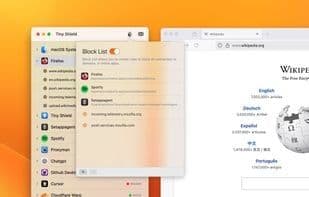
Display hostnames instead of IPs: Human-readable domain names, not meaningless IP addresses.
Works with HTTPS and DNS: Tiny Shield can decrypt hostnames from Google Chrome and Firefox.
Block unwanted traffic from specific websites on your Mac or prevent entire applications from accessing the internet.
Block domains/websites: Precisely control access to specific sites and domains.
Block entire applications: Completely stop apps from reaching the internet at the system level.
Tiny Shield is designed to be the most developer-friendly network monitoring tool, with features that make it easy to understand and control network traffic.
Lightweight and fast: Tiny Shield uses system extensions to monitor all traffic from your Mac without impacting performance.
Show hostnames instead of IPs: Tiny Shield displays hostnames instead of IP addresses, making it easier to identify websites—far better than just showing IPs.
Current upload/download traffic in charts: Tiny Shield shows real-time incoming and outgoing traffic on your Mac, so you always know what’s happening.
Simple licensing: A one-time purchase includes 2 years of updates—no subscriptions, no hidden fees.
With Tiny Shield, monitor every connection, block unwanted traffic, and protect your Mac. Buy once, use for life.
How to use Tiny shield?
Tiny Shield is a cybersecurity tool that protects Mac computers by monitoring all network connections and blocking malicious traffic, while offering a user-friendly way to view all internet activity.
Core Functions of Tiny shield
Lightweight
Security-focused
Ad-Free
No Registration Required
Outbound firewall
Website Blocking
Usage Scenarios of Tiny shield
- Protect Mac network security by blocking malicious connections
- Centrally view all internet activities on your Mac
- Block access to specific websites or domains
- Completely block applications from accessing the internet
- Monitor network traffic with human-readable domains instead of IP addresses
- View Mac's sent and received traffic via charts
Common Questions about Tiny shield
What does Tiny Shield do?
How do I use Tiny Shield?
What are the core features of Tiny Shield?
What are the use cases for Tiny Shield?